PackPoint is one of the best-known packing apps, and for good reason. Tell it where you're going and for how long, and it hands you a sensible checklist in seconds. Packlier does something different with the same starting point. Both are worth knowing about, and the right one depends on what you find hard about packing.
The short answer: PackPoint tells you how many shirts to pack. Packlier tells you which ones. If you want a fast checklist so you don't forget anything, PackPoint does that well. If the hard part is choosing clothes that go together and still fit in your bag, that's what Packlier is built for.
At a glance
| PackPoint | Packlier | |
|---|---|---|
| What you get | A checklist of items and counts | A capsule of specific pieces, every outfit they make and a checklist |
| Weather | Forecast for your destination | Forecast when the trip is close, usual climate when it isn't |
| Clothes | Counts by type, like "5 shirts" | Named pieces in a color palette, like a merino turtleneck in ivory |
| Outfits | Not part of the list | Every combination shown, with a plan for each day |
| Your bag | Not part of the setup | Checked against six bag sizes, trimmed if it won't fit |
| Your own clothes | Add custom items to the list (Premium) | Photograph pieces you own and pack from them |
| Groups | Share a list with other travelers (Premium) | A capsule, bag and list for each traveler (Pro) |
| Itineraries | TripIt sign-in creates lists for you (Premium) | Enter the trip yourself |
| Platforms | iPhone and Android | Android, with iOS on the way |
| Price | Free, with one-time Premium purchases | Free, with an optional Pro subscription |
PackPoint details are from its website and App Store listing, as of October 2026.
How each one builds your list
PackPoint asks for your destination, departure date and number of nights, then whether the trip is for business or leisure and what you'll be doing, such as hiking, the beach or a formal dinner. It checks the forecast and builds a checklist: clothes by type and quantity, toiletries, documents, an umbrella if rain is coming, and items for each activity. You can tap to change a count, swipe away what you don't need, and tick things off as you pack. Options like Laundry and Repeat Basics bring the counts down for longer trips.
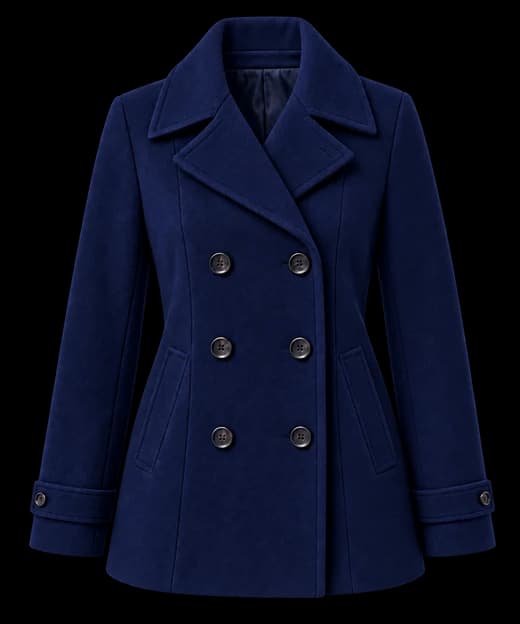
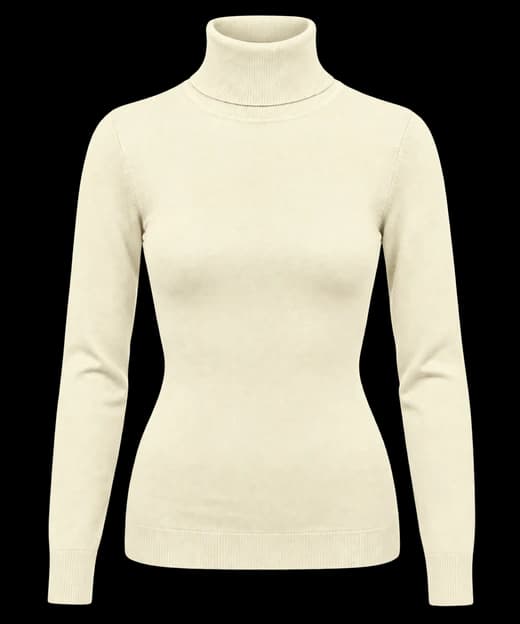
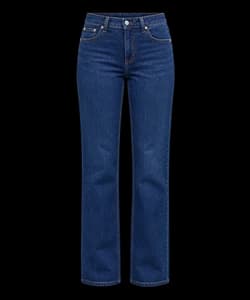
Packlier asks five questions: destination, dates, the kind of trip, your bag and a color palette. Then it picks the clothes. A week becomes a 3×3×3 capsule, three layers, three tops and three bottoms that all work together, which makes twenty-seven outfits. Each piece is chosen for the climate, the formality of the trip and the palette, so you get "a merino turtleneck in ivory" rather than "tops: 5." The rest of the list, from socks counted from the nights away to chargers and documents, comes after.
The difference shows up at home, in front of your closet. A PackPoint list tells you to bring five tops and leaves the choosing to you. A Packlier capsule has already done the choosing, and shows you how each piece goes with the others.
Clothes, outfits and color
This is where the two apps differ most.
PackPoint treats clothes as items to count. That suits people who already know what they'll wear and just want a reminder of how much.
Packlier is built around the outfits. Every capsule uses a palette, one base color, one neutral and one accent, so every top goes with every bottom. You can swipe through each look, choose its shoes and accessories, and put a look on each day of the trip. Don't like a piece? Tap it to see only what would work in that slot, and your pick stays put if the dates change.
Here's what that looks like for a week in Paris in December:
Will it fit in the bag?
PackPoint's setup asks about your destination, dates and activities, not the bag you're bringing. Packlier asks, and it measures the capsule against the space you'll actually have, from a 16-liter personal item to a checked bag with a carry-on. If the plan is too big, it trims the pieces you'd miss least. If it still won't close, it tells you, instead of leaving you to find out the night before.
Packing for more than one person
With Premium, PackPoint lets you share a list with the people you're traveling with. Packlier Pro gives each traveler a capsule, a bag and a list of their own, planned together, and each one can wear their own palette. Packing goes by age: a child gets a grid sized for them, and an infant gets a count of changes per day rather than outfits.
Using what you already own
On PackPoint Premium, you can add your own items and activities to the lists. Packlier lets you photograph the clothes you own, and the grid shows your shirt rather than a catalog one. Mark a piece as owned on any trip and it's saved for the next one, and Pro can build a whole capsule from your own wardrobe.
Itineraries and trip details
PackPoint has a feature Packlier doesn't: sign in with TripIt, and it creates packing lists for your upcoming trips automatically. If you already keep your travel plans in TripIt, that's a real convenience.
With Packlier you enter each trip yourself. It only takes a minute, and it supports up to sixty nights and, on Pro, up to five stops on one trip, each with its own dates and climate.
Price
PackPoint is free to download. On iPhone, the Premium Package is a one-time $2.99, with smaller one-time add-ons such as TripIt integration for $0.99 (App Store, October 2026). There's no subscription.
Packlier is free on Android, and the free version is a full app. It builds a capsule, checks the weather and the bag, plans each day, and includes every palette, the checklist and trip reminders, for as many trips as you like. Pro costs $4.99 a month or $29.99 a year, with a seven-day free trial on the yearly plan. It adds group packing, trips with more than one stop, starting from a previous trip and building from your own wardrobe.
If you only want a checklist, PackPoint's one-time price is hard to beat. Packlier's subscription pays for the parts that take more work: a capsule for each traveler, multi-stop trips and your own wardrobe.
Which should you choose?
PackPoint is a good fit if:
- You want a quick checklist and already know what you like to wear.
- You use TripIt and want lists made for you.
- You're on an iPhone. Packlier isn't on iOS yet.
- You'd rather pay once than subscribe.
Packlier is a good fit if:
- You stand in front of your closet not knowing what goes with what.
- You want to pack light, in a carry-on or a personal item, and know it will fit.
- You care how you look in the photos, not just whether you remembered socks.
- You're packing for a family or a group, each with their own clothes and bag.
Plenty of people would be happy with either. The question is whether you need help remembering things or help choosing them.
The short version
- PackPoint builds a checklist from your trip, the weather and your activities. Packlier builds a capsule of specific pieces, then the checklist.
- Packlier shows every outfit and plans each day; PackPoint leaves outfits to you.
- Packlier checks that it all fits your bag; PackPoint's setup doesn't ask about the bag.
- PackPoint connects to TripIt and works on iPhone. Packlier is on Android for now.
- PackPoint Premium is a one-time purchase. Packlier is free, with an optional Pro subscription.
If choosing the clothes is the hard part, try Packlier. Tell it where you're going and when, and it builds a capsule where every piece goes with every other, sized to the bag you're bringing.